
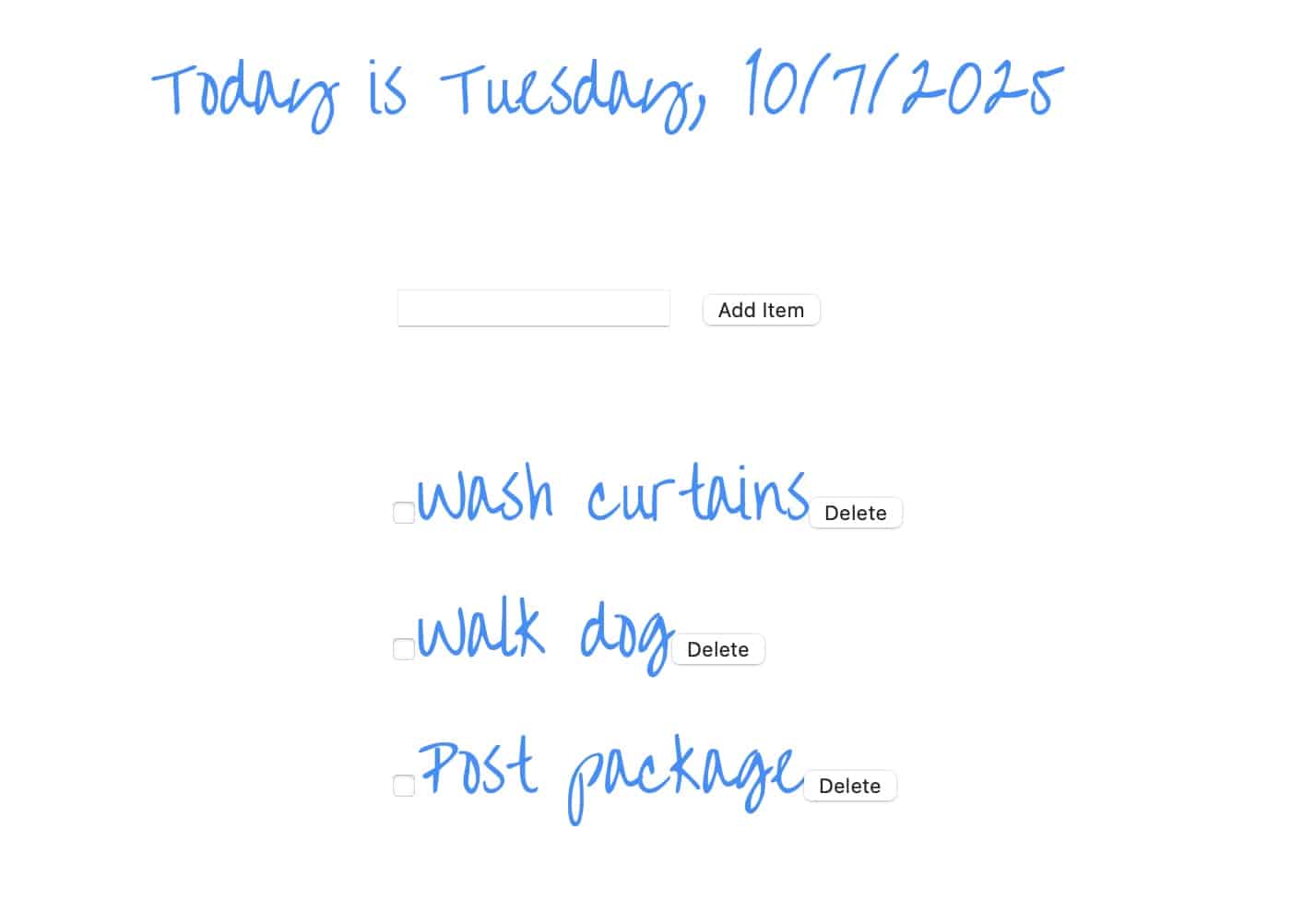
This is a common starter project to show how HTML, CSS and Javascript work together.
Data is stored in Local Storage.
Javacript Code:
// Retrieve the NodeList from local storage
const storedList = getNodeList('myList');

if (storedList) {
  // Recreate the elements
  const elements = createElements(storedList);
  // Append the elements to the ul
  const container = document.getElementById('theList');
  elements.forEach(element => container.appendChild(element));
}

//Get today's date and display
const now = new Date();
const dayOfWeek = now.toLocaleDateString('en-US', { weekday: 'long' });
const date = now.toLocaleDateString('en-US');
const dateHeading = document.querySelector(".date-heading");
dateHeading.textContent += `Today is ${dayOfWeek}, ${date}`;


const ulList = document.querySelector("ul");
checkIfZeroTasks();

const add_item_button = document.querySelector(".submit-button");

//Add Item Button Click Logic
add_item_button.addEventListener("click", function (e) {
const inputValue = document.querySelector("input[type='text']");

 if (inputValue.value != "") {
  const li_element = document.createElement("li");
  const input = document.createElement("input");
  input.type = "checkbox";
  const button = document.createElement("input");
  const text = document.createTextNode(inputValue.value);
  button.type = "button";
  button.value = "Delete";
  li_element.appendChild(input);
  li_element.appendChild(text);
  li_element.appendChild(button);
  ulList.appendChild(li_element);

storeToDos();
checkIfZeroTasks();
inputValue.value = "";
inputValue.focus();
}
});

function checkIfZeroTasks () {
  const allLIs = document.querySelectorAll("li");
  if (allLIs.length === 0) {
    const message = document.createElement("span");
    const span_text = document.createTextNode("No to-do items");
    message.appendChild(span_text);
    message.className = "no-item-msg";
    ulList.insertAdjacentElement("beforebegin", message);
  }
  else {
    const message = document.querySelector(".no-item-msg");
    if (message != null) {
    message.remove();
    }
  }
}

//Event Listener to Remove the to-do item
//Put on document level so that it delegates
	document.onclick = function(e)
	{
  //Click was on Delete Button
	  if (e.target.tagName === 'INPUT' &&
      e.target.value === "Delete") {
       const parentElement = e.target.parentNode;
	     parentElement.remove();
       storeToDos();
       checkIfZeroTasks ()
	   }
 //Click was on Checkbox
	  if (e.target.tagName === 'INPUT' &&
      e.target.type === "checkbox") {
      //Get parent element and toggle the class on it
      const parent = e.target.parentElement;
      parent.classList.toggle("to-do-done");
      //Store to dos in case check box checked staus has changed!
      storeToDos();
    }
	}

//Utility functions to store to-do list in Local Storage
//Convert the NodeList to an array of HTML strings:
function nodeListToArray(nodeList) {
   return Array.from(nodeList).map(element => element.outerHTML);
    }
//Store the Array in Local Storage
function storeNodeList(key, nodeList) {
   const htmlArray = nodeListToArray(nodeList);
   localStorage.setItem(key, JSON.stringify(htmlArray));
    }
//Retrieve the array from local storage.
function getNodeList(key) {
   const storedArray = localStorage.getItem(key);
   return storedArray ? JSON.parse(storedArray) : null;
    }
//Recreate the elements from HTML strings.
function createElements(htmlArray) {
  console.log(htmlArray);
   return htmlArray.map(htmlString => {
       const tempDiv = document.createElement('div');
       tempDiv.innerHTML = htmlString;
       return tempDiv.firstChild;
      });
    }
function storeToDos() {
  const listItems = document.querySelectorAll('li');
  storeNodeList('myList', listItems);
}
CSS code:
/* Over the rainbow font */
@import url(https://fonts.googleapis.com/css?family=Over+the+Rainbow);

:root {
  --paleBlue: #1e90ff;
  --font: 'Over the Rainbow';
}


html {
   font-family: sans-serif; /* Fallback font for old browsers */
   font-family: var(--font);
   font-size: 36px;
   color: var(--paleBlue);
}

.container {
  display: flex;
   flex-direction: column;
  align-items: center;
}
ul{
  list-style-type: none
}
.to-do-done{
  color: blue;
  text-decoration: line-through;
}
HTML:
<div class="container">
<p class="date-heading"></p>
<form>
  <input class="input-task" type="text" autofocus></input>
<input class="submit-button" type="button" value="Add Item"></input>
</form>
<ul id="theList">
</ul>
</div>
Leave a Reply